Messages: SMS Texting App
- 3.9
- Rating
- 10.00M
- Installs
- Free
- Price

 Analysis by App-foxy
Choosing a texting app sounds simple until the small daily details start to matter. I tested Messages: SMS Messaging App as a practical communication tool rather than treating it like another social platform, and my overall impression is clear: it is aimed at people who want a straightforward place for SMS and MMS conversations, with the added convenience of preparing messages for later. That focus makes it easy to understand, but it also means the right choice depends on how much you expect from your main messaging app.
This is a free communication app from Apps Specials, available to users aged Everyone. It has reached more than ten million installs and holds a 4.2 average from roughly 184 thousand ratings, which suggests that the basic idea works for a broad audience. I would not choose it simply because of those numbers, though. I would choose it if I wanted a dedicated texting experience that stays closer to ordinary carrier messaging than to account-based chat services.
What to consider before making it your everyday messenger
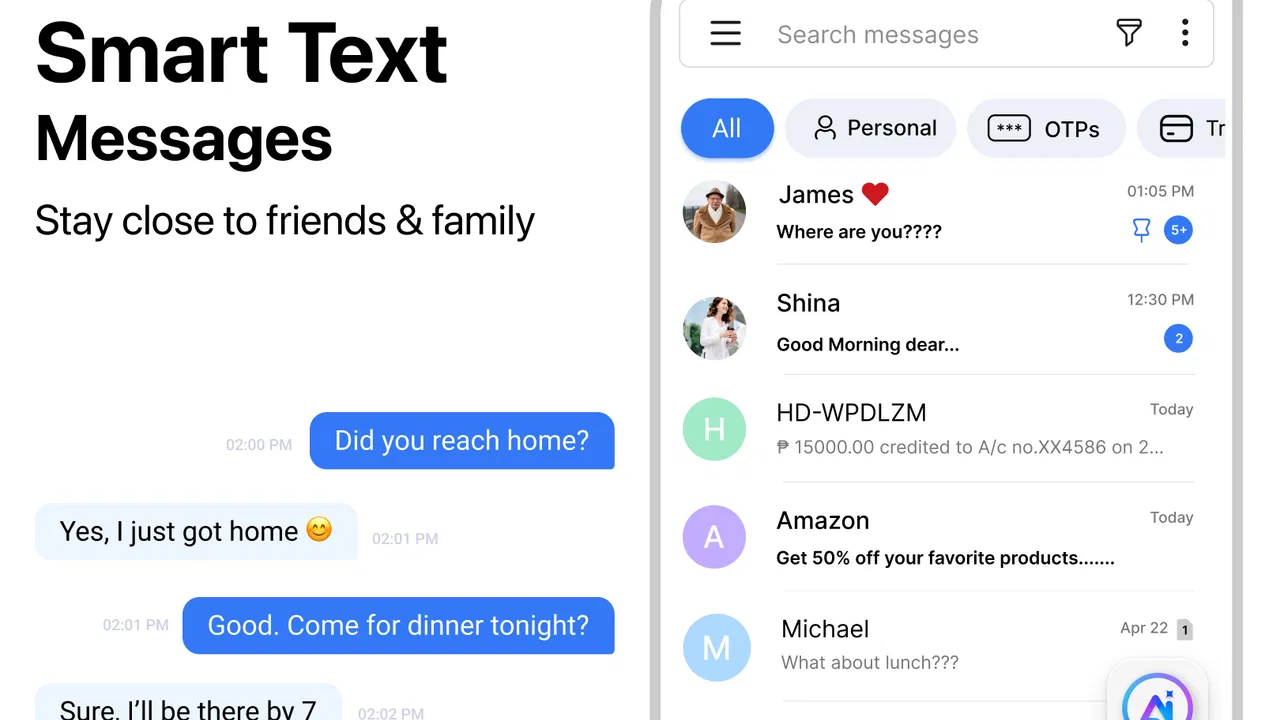
The first decision is whether your conversations are mainly traditional SMS and MMS. Messages: SMS Messaging App is not presented as a replacement for every kind of communication. Its useful territory is the familiar phone-number conversation: sending a text, handling picture messages, and organizing chats in one place. If that matches your routine, the app has a sensible starting point.
You May Also Like

 Blood Strike: 2.5 Anniversary
Blood Strike’s Loadouts Turn Every Drop Into a Tactical Gamble
A close look at Blood Strike’s custom loadouts: how fast access to signature weapons reshapes its battle royale rhythm, rewards preparation, and narrows the gap between fights.

 Pandora - Music & Podcasts
Pandora’s Music Is Easy to Start, but Harder to Recover
Pandora’s strength is its low-effort path from a seed to a station. Its weak spot is how much confidence it asks you to place in connection, setup, and quiet recovery.

 8 Ball Pool
 Is Built on Rivalries, Rematches, and Routine
A close look at the rivalries, rematches, shared routines, and unanswered safety questions that turn a quick pool match into a persistent mobile community.

 Samsung Music
’s Quiet Strength Is Playing What You Already Own
Its reach comes less from spectacle than from dependable access to a personal library. That simplicity is both the app’s strongest retention engine and its ceiling.

 AccuWeather: Weather Radar
AccuWeather Review: A Quick, Clear Forecast for Everyday Decisions
For everyday plans, the best forecast is the one you can understand quickly. AccuWeather makes rain timing, radar, and local conditions easy to act on, with a few trade-offs.

 Hill Climb Racing
Why Hill Climb Racing Still Turns Crashes Into One More Run
A tiny car, a bumpy hill and one more upgrade: Hill Climb Racing keeps resurfacing because its simple chaos makes every near-miss feel personal.
More From Our News Desk



The second question is how often you need to send something later instead of immediately. Scheduling can be valuable for reminders, birthday greetings, work-related messages, or a note you want to prepare while you are thinking clearly but deliver at a more suitable time. In my experience, this is the feature that gives the app a reason to exist beyond simply offering another screen for texting.
I also look at how much friction an app adds to a basic task. A messaging tool should let me open a conversation, understand what has already been said, write a reply, and send it without making me learn a complicated system. This app’s appeal comes from keeping the main purpose visible. That simplicity is helpful for family members who do not want a large social platform, and for anyone who sees messaging as a utility rather than a place to spend time.
There is a practical distinction between SMS, MMS, and internet messaging that is worth keeping in mind. Traditional carrier messages depend on the phone service and plan behind them, while services such as internet chat platforms depend on data access and usually require the other person to use the same service. This app belongs to the first group. That can make it convenient when you need to reach a phone number without asking someone to install a particular chat service, but it also means the experience is tied to the normal limitations of carrier texting.
The everyday workflow feels familiar
When I think about using this app during a normal day, the strongest use case is not a long group conversation. It is the quick exchange that needs to remain connected to a phone number: confirming an appointment, replying to a family member, sending a short update, or sharing a photo through MMS. The familiar format reduces the mental effort involved. I do not have to decide which social network a person prefers before starting the conversation.
A realistic example is preparing a message to a relative about picking up a child after school. I could write it earlier in the day, schedule it for the time when the reminder is useful, and avoid relying on memory later. The value is not that the message is sophisticated; the value is that the app turns a small intention into a planned action. I would still check the recipient and delivery timing carefully before relying on it for anything urgent.
Scheduling also changes how I handle messages across different routines. If I am awake and planning tomorrow’s tasks, I can prepare a text without sending it at an inconvenient hour. For recurring personal habits, such as sending a regular check-in, this can be more comfortable than leaving a note in a calendar and hoping I remember to copy it into a conversation. The trade-off is that scheduled messaging introduces another step that ordinary texting does not require, so it is most useful when timing genuinely matters.
Where this app has a real advantage
The strongest reason to use this app is the combination of ordinary SMS and scheduled sending in one focused workflow. Many people do not need stickers, public profiles, channels, or a large collection of social features. They need a dependable-looking conversation list and an easier way to handle messages that should go out later. This app stays close to that need instead of asking the user to build a new communication habit around a separate network.
That makes it particularly suitable for mixed-contact households. One person may prefer one internet messenger, another may avoid installing extra services, and a third may use only the phone’s standard texting system. SMS and MMS can bridge those preferences because the recipient does not need to join the same app-based community. For me, this is more important than visual novelty: a messaging tool is useful when it works with the people I already need to contact.
The app can also be a better fit for someone who wants a clear boundary between carrier texting and social communication. A large internet messenger often brings extra conversations, media, notifications, and account-related decisions. A focused SMS tool can feel calmer because its purpose is narrower. That does not automatically make it better, but it can make it easier to find the conversation I meant to answer.
Another less obvious benefit is planning without turning a message into a formal task. A calendar reminder tells me to do something; a scheduled text prepares the actual communication. For a simple reminder to a household member, that can remove one small point of failure. I would use it for low-risk timing-sensitive messages, not for emergencies or situations where delivery must be guaranteed at a precise moment.
Small habits that make scheduled texting safer
I would build a quick review habit into every scheduled message. Before confirming it, I would check the recipient, the wording, and the intended time. A scheduled message can be more dangerous than an immediate one if I write it in a hurry and forget about it. The app makes delayed sending convenient, but convenience should not replace a final check.
I would also avoid using scheduling as a substitute for urgent communication. If someone needs an answer now, I would send the message immediately or use a communication method that supports a live exchange. Scheduled SMS is best for reminders and planned updates, not for situations where a delay could create confusion or risk.
For MMS, I would keep the message purpose in mind and remember that picture messaging is still subject to the normal carrier experience. A photo may be less predictable than a short text depending on the recipient’s service and connection. The app gives me a place to compose and send the message, but it cannot turn carrier messaging into an internet chat system.
Where a different category may suit you better
If most of my conversations happen through internet-based services, I would probably choose an app designed around that environment instead. Those services are generally more appropriate when I need rich group discussions, active media sharing, message reactions, desktop continuity, or communication that does not depend on traditional carrier texting. I would not move to this app expecting it to replace every feature associated with a modern chat platform.
An internet messenger may also be the better choice when my friends and family already use one shared service every day. The biggest advantage of a networked platform is often not the interface but the fact that everyone is already there. Switching to an SMS-focused app would not necessarily improve those conversations. It could split my communication between two places, which makes searching and responding less convenient.
On the other hand, I would hesitate to rely on a typical social messenger when I regularly contact people who do not share the same platform. In that situation, traditional texting has a practical advantage. Messages: SMS Messaging App is more relevant when reachability by phone number matters more than advanced online features.
There is also a difference between a basic phone messaging app and a privacy-centered communication service. If my main priority were specialized privacy controls, encrypted internet conversations, or a tightly managed account ecosystem, I would compare services built specifically around those needs. This app’s central promise is practical SMS and MMS handling, so I would not assume that a focused texting interface automatically provides every protection or control found in a dedicated secure messenger.
Likewise, people who need business-grade collaboration should look elsewhere. A texting app can handle short operational notes, but it is not the same as a workspace with shared files, task ownership, searchable project history, or structured team channels. The right category depends on whether the conversation is personal and phone-number based or part of a larger work system.
What switching actually involves
Moving to a different messaging app is rarely just an installation decision. The real cost is rebuilding the habit of opening one place for every conversation. If I switch from a familiar default messenger, I would first identify which contacts need SMS, which conversations are internet-based, and whether I want one app to handle all available texting duties. That short inventory prevents disappointment later.
I would also expect a period of adjustment around notifications and message handling. A new app may become the place where I read and reply to texts, so I would pay attention to whether I am accidentally checking two inboxes or replying from the wrong one. The cleanest switch is usually the one where I make a deliberate choice about my primary texting app instead of leaving several tools competing for attention.
Scheduled messages deserve their own transition check. If I previously used calendar reminders or notes, I would move only the reminders that benefit from automatic delivery. I would not transfer every reminder into scheduled texting, because too many planned messages can become noise for both me and the recipient. The feature works best when reserved for clear, useful moments.
Cost is another part of the decision. The app is free to download and use as its basic offering, while in-app purchases range from about two dollars to around fifty dollars per item. That means I would explore the free experience first and avoid assuming that every useful option is included without an additional purchase. For a simple SMS workflow, I would judge any paid feature by whether it saves meaningful time rather than by how many extras it adds.
The current version is 2.5.25, and the app requires Android 6.0 or later. That makes compatibility a straightforward check before installing it on an older device. I would also remember that the app’s own version number does not change the underlying carrier requirements for SMS and MMS. A compatible phone is necessary, but the quality of the messaging experience still depends on the mobile service supporting the messages.
Who should use it, and who should skip it
I would recommend it to someone who sends regular phone-number texts, occasionally shares pictures through MMS, and wants a convenient way to plan messages for later. It is especially sensible for users who do not want to persuade every contact to join a new chat network. The free starting point also makes it easy to test whether the workflow matches personal habits before spending anything inside the app.
I would also consider it for a family member who finds large social platforms distracting. A focused communication app can be easier to explain: open a conversation, write the message, send it, or choose a later time. That is a modest benefit, but modest benefits are often exactly what make a utility app stick.
I would skip it if my conversations are mostly in internet-based groups, if I need advanced collaboration tools, or if I expect a rich multimedia platform rather than a traditional texting utility. I would also skip it as my sole communication solution if I need specialized privacy features or dependable real-time communication for urgent situations. In those cases, another category is a more honest fit.
The rating of 4.2 from around 184 thousand ratings gives the app a reassuring first impression, while its broad install base shows that the concept has reached many Android users. Still, those signals should support a personal trial rather than replace one. Messaging preferences are unusually dependent on contacts, carrier service, notification habits, and the kind of conversations I have every day.
My recommendation after weighing the trade-offs
My recommendation is positive but specific: try Messages: SMS Messaging App if you want a dedicated SMS and MMS experience with scheduling as its main extra convenience. I like the way that combination addresses a real everyday problem without requiring a whole new social network. The app is most convincing when I treat it as a practical texting tool, not as a universal replacement for every messenger on my phone.
I would start with a few ordinary conversations, then test one non-urgent scheduled message and see whether the process feels natural. That trial reveals more than browsing feature claims. If I rarely schedule texts, the app may not offer enough difference from a standard messenger to justify changing habits. If I often think of messages at the wrong time or need to reach people through phone numbers, the scheduling workflow can make the switch worthwhile.
In the end, this is a focused choice rather than an all-purpose one. Apps Specials has built a communication app around the familiar SMS and MMS format, and that narrow direction is both its strength and its boundary. For planned, phone-number-based texting, I would recommend giving it a fair test; for feature-rich online chat or structured work communication, I would choose a more specialized alternative.
FAQs for Messages: SMS Texting App
01What features does the Messages: SMS Messaging App offer?
The Messages: SMS Messaging App provides a range of features including text messaging, multimedia sharing, group chats, customizable themes, and end-to-end encryption for secure communication. It also supports scheduled messages and backup options, ensuring that your conversations are safely stored and easily retrievable.
02Is the Messages: SMS Messaging App free to use?
Yes, the Messages: SMS Messaging App is free to download and use. However, it may offer in-app purchases for premium features such as additional themes, advanced customization options, or ad-free experiences. Check the app store listing for specific details on available purchases.
03How secure is the Messages: SMS Messaging App?
The Messages: SMS Messaging App prioritizes user privacy with end-to-end encryption for secure communication, ensuring that only you and the recipient can read the messages. It also offers features like password protection and secure backups, making it a safe choice for your messaging needs.
04Can I use the Messages: SMS Messaging App on multiple devices?
Currently, the Messages: SMS Messaging App is designed for use on a single device. However, you can back up your messages to the cloud and restore them on a new device if needed. Check the app’s support page for any updates regarding multi-device compatibility.
05Does the Messages: SMS Messaging App work offline?
Yes, the Messages: SMS Messaging App allows you to draft messages and view previously downloaded messages while offline. However, sending and receiving new messages require an active internet connection or cellular network. This makes it convenient for planning messages without immediate internet access.
Pros
- Intuitive and user-friendly interface.
- Supports multimedia messaging features.
- Customizable themes and colors.
- Quick and reliable message delivery.
- Secure with end-to-end encryption.
Cons
- Lacks advanced organization options.
- Limited support for group chats.
- Occasional ads in free version.
- No cloud backup for message history.
- Requires frequent updates for bugs.

Messages: SMS Texting App
Gallery